This tutorial will explain how to create a facebook application using Graph api and PHP.For those who are new to Facebook platform you need to learn the basics of Graph api.We are about to build a facebook application you can see a demo here

facebook-platform
This tutorial will use PHP code-See PHP tutorials on our site
Introduction to Facebook platform
Facebook allows developers to build applications using facebook platform which has
FBML – Facebook Markup language
FQL – Facebook Query Language
FQJS – Facebook JavaScript
These are basically derived from standard HTML,SQL and javascript to suit the facebook environment.Other than this you need to knoe how the facebook environment is built.Each and every element in facebook is easily accessible from “Graph – API ” which was improved version of REST api which was used previously.
Suppose you want to access the profile picture of a person you can simply call this API
http://graph.facebook.com/mjeyaganesh/picture
This url simply returns the profile picture of the my facebook account.All you need is the name or UID of the person, in this case you can access my profile picture using my UID also.The power of Graph Api is self explained,you dont need to do complex program to do this easy task.
You can easily access information like name,age,gender,location,friends etc I would recommend you to read Graph api documentation.Keep in mind that not all information is accessible you need to get a permission or access token from the user to access it.
Step 1: Create a new application
Our first step to create a facebook application is go to http://www.facebook.com/developers/ and click “set up new application “.Give your application a name and agree the terms click submit.

facebook application
Step 2: Fill in the details of the application
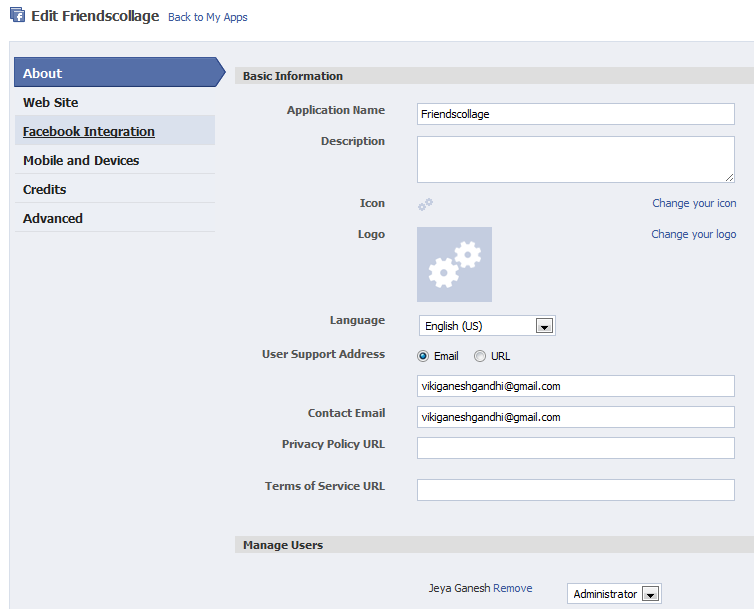
You will be directed to this page to fill up the essential details of the application.
Step 3: Fill in the facebook integration
Every application has application ID,application secret key and api key unique to every application.You need to fill in the details like canvas page ,canvas url etc.
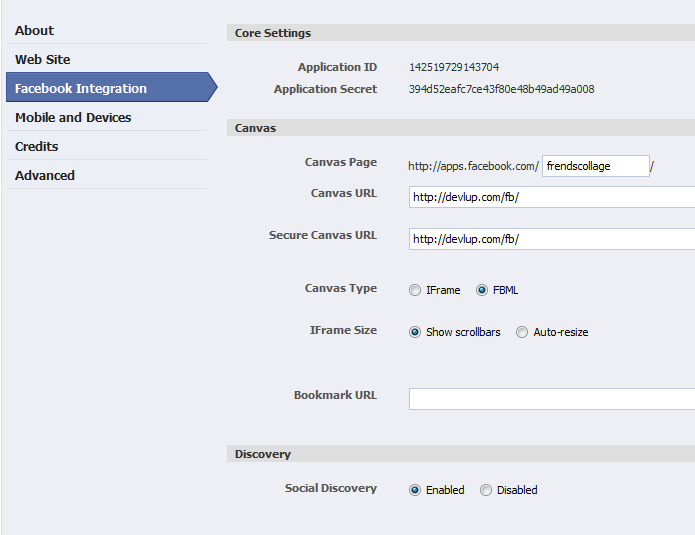
Note: Kindly use “https” in the secure canvas url.
The canvas page is your facebook application url,you can see your application in that URL.
Canvas URL- Each application is just a simple PHP page which will be hosted on your server and the canvas page simply renders the application inside facebook.In this case I have hosted my files at “www.devlup.com/fb/”
See about canvas

Application architecture
Step 4 : Complete registration
For now click save changes [you can edit details later ]
Step 5 : Download client library
To get started in programming you need the client library.In this case we are developing in PHP hence download php client library.There are other client libraries for Javascript,iOS,android sdk’s [ see here] .

PHP SDK
Step 6 :Upload the library
Create a folder in your server and extract the library files there,The “src” folder has facebook.php which will serve as the client library.

Step 7 : Set defaults
1 2 3 4 5 6 7 8 9 10 11 | <?php include_once "src/facebook.php"; $app_id = 'APPID'; $application_secret = 'APP SECRET'; $facebook = new Facebook(array( 'appId' => $app_id, 'secret' => $application_secret, 'cookie' => true, // enable optional cookie support )); |
Step 8: code
Check whether the user is logged into facebook before loading the application.If the user is not logged in show the $loginurl
1 2 3 4 5 6 7 8 9 10 11 | if ($facebook->getSession()) { { $user = $facebook->getUser(); } else { $loginUrl = "https://graph.facebook.com/oauth/authorize?type=user_agent&display=page&client_id=APPID &redirect_uri=http://apps.facebook.com/CANVAS URL/ &scope=user_photos"; echo '<fb:redirect url="' . $loginUrl . '"></fb:redirect>'; } |
Step 9 : Fetch details
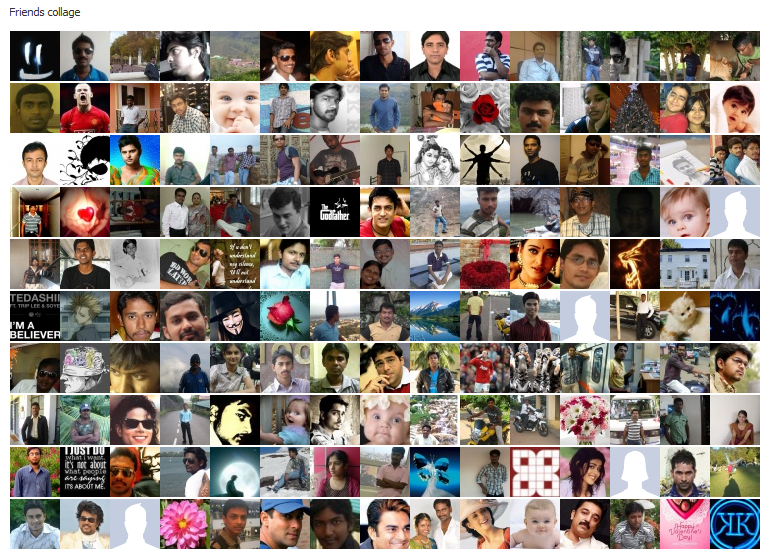
The concept of this application is to display all the profile pictures of your friends in single page
First get the UID of the current user loggin by calling the function getuser()
1 2 3 4 5 6 7 8 9 10 11 | $uid = $facebook->getUser(); //get the UID of the current user $me = $facebook->api('/me/friends'); // access all the information of friends // $me has the JSON detail of all the facebook friends of the current user echo "Friends collage"; foreach($me['data'] as $frns) { // Display the picture of friends one by one echo "<img src="https://graph.facebook.com/".$frns['id']."/picture" title="".$frns['name'].""/>"; } |
Step 10 : Complete coding
1 2 3 4 5 6 7 8 9 10 11 12 13 14 15 16 17 18 19 20 21 22 23 24 25 26 27 28 29 30 31 32 33 34 35 36 37 38 39 40 | <?php include_once "src/facebook.php"; $app_id = 'APPID'; $application_secret = 'APP SECRET'; $facebook = new Facebook(array( 'appId' => $app_id, 'secret' => $application_secret, 'cookie' => true, // enable optional cookie support )); if ($facebook->getSession()) { $user = $facebook->getUser(); $uid = $facebook->getUser(); $me = $facebook->api('/me/friends'); echo "<br />Total friends".sizeof($me['data'])."<br />"; echo "<br /> Friends collage<br /><br />"; foreach($me['data'] as $frns) { echo "<img src="https://graph.facebook.com/".$frns['id']."/picture" title="".$frns['name'].""/>"; } echo "<br /><br /><br /> By <br /><a href="http://facebook.com/mjeyaganesh"><img src="https://graph.facebook.com/1147530774/picture" title="Jeyaganesh"/></a>"; } else { $loginUrl = "https://graph.facebook.com/oauth/authorize?type=user_agent&display=page&client_id=APPID &redirect_uri=http://apps.facebook.com/CANVAS URL/ &scope=user_photos"; echo '<fb:redirect url="' . $loginUrl . '"></fb:redirect>'; } ?> |
After saving the file.Proceed to your canvas URl to see the demo of your application[http://apps.facebook.com/canvasurl] you can submit to facebook app directory after 10 people start using your application.
Update:
I have created one other tutorial on how to build facebook application using facebook query language.
Step:11 Outcome

Access permission for first time user
You can follow us on Twitter or join our Facebook Fan Page for more Facebook apps.
Developer Link

thanks for sharing this whole tutorial…will be very clear and helpful… 🙂
Thanks for the comment Rohit
A very clear tutorial, perfect for novice users. However, it seems I’m too novice as it’s not working for me. When I access my app, I just see a blank canvas. I’m not redirected to the login/permissions page. When I view the frame source, all I see is the “<fb:redirect url" bit. When I open this URL I do get the login page, but it doesn't open for itself. Any idea what could be causing this?
Also, in your screenshot you specify the http canvas URL as secure canvas URL as well. When I do the same, Facebook says the URL needs to be https (which makes sense).
Ah I’ve already figured out what the problem was. It’s important to know that the default canvas type is set to IFrame, not to FBML. In order for the fb:redirect to work, you will of course have to change the canvas type.
Thanks michel for your tip..
Hi,
Great work done in this blog post, but here are some corrections which you need to do and which will help to others to follow it in ease.
1. In this image the secure field would stay empty as there is no https in tht url which you have shown – 3.facebook-application.png
2. ps.facebook.com/CANVAS URL/
Please notify it some where that we also need to edit these values in url like APPID and CANVAS URL
3. in the Complete code snippet you have missed this
>>>> echo ”;
And just cause of this few missing informations i lost an hour in finding the prb. 🙂
But did learnt some new error ways. Please update it, as you blog is good.
Thanks.
Hi,
I would need a help with an application,, random image script I need for FB.. can u help me?
tx
Thanks kunal.Good you liked our blog.
Thanks for pointing out the “https” error I have mentioned the change below that image.I find some issues in displaying code here so its better to follow the complete code via the link “http://www.box.net/shared/289242xf8k”
Hello,
In your sample we see that you have entered “http” instead of “https” at the input of
Secure Canvas URL.
When i try to do it i get an error that i need “https”.
Appreciate your explanation.
Thanks,
Berko
How can i post a picture to a users profile, say as their profile picture or as a comment to look at their new picture?
You can publish to user profile by publish_stream method.. see the reference here http://developers.facebook.com/docs/authentication/permissions/
D tutorial is great, yaar!
I want to create an app fr a group. N in d developers.facebook documentation i found dat, we need to an object of ‘group’.
How can I create object of a group. Can u demonstrate?
Can you help me with this error when I start my facebook app :
FBML Error (line 20): illegal tag “map” under “fb:canvas”
FBML Error (line 21): illegal tag “area” under “fb:canvas”
FBML Error (line 22): illegal tag “area” under “fb:canvas”
FBML Error (line 23): illegal tag “area” under “fb:canvas”
FBML Error (line 24): illegal tag “area” under “fb:canvas”
FBML Error (line 28): illegal tag “body” under “fb:canvas”
May i know from where are you having your application files? i mean the host?
after loading the application right click->view source and check whether the application shows you the correct html or not..
If you are using iframe based app i would advice you to switch to fbml app
Thanks for your reply Jeyaganesh..
I host my files at 000webhost.com, i think my host couldn’t handle the request.
Do you mean the canvas type must be the FBML type.
And can i test your code at my local server? Is it working correctly?
I guessed that you would be using 000webhost because there is a common problem on facebook apps using that host.
Thank you for the tutorial. I have been testing it and you forgot the IF sentence in the authorization zone:
IF () <- you forgot this.
{
echo "
By “;
}
else {
$loginUrl = “https://graph.facebook.com/oauth/authorize?type=user_agent&display=page&client_id=APPID
&redirect_uri=http://apps.facebook.com/CANVAS URL/
&scope=user_photos”;
echo ”;
}
Can you add it?
Thank you again
Hi muguel. The code working i Guess. have you tried the code?
Hey
Also I wanna know how to post to the logged in user wall?
Pleae let me know ASAP
send me mail on dev.ahmedadel@gmail.com
You need to authorize app with stream.publish permission ahmed.
Hi all,
I am on the way of developing the above application, and now facing an error .
after authenticating (clicking Allow in Request for permission), the browser is looping with the following URLs,
1. http://apps.facebook.com/APPS NAME/etc
2. http://www.facebook.com/connect/uiserver.php?app_id=etc
Whats wrong with my code.
Please help me…
Ashok
please download our source code from here [http://www.box.net/shared/289242xf8k] please try this code,it will work
Thank you Jeyaganesh, now its works fine….
Hello i got another error also,
it is looping there after click the “Allow” permission.
The application link is:
http://apps.facebook.com/ioss-mlm/
help
sure. what is the issue you are facing?
Hello sir,
i cant understand wat i hve to do with the code.i have created a folder in the server and extracted the client library files there.There after is there any modification required in the facebook.php file?if so wat are the modifications i need to do
Pavan,
You dont need to change the facebook.php.Its just the library that is used as is.
If you need any clarifications kiindly post here.
Thanks.
hello.
great tutorial but i cant get it to work.
tried your tutorial using that code and i got this error
Parse error: syntax error, unexpected T_STRING, expecting ‘,’ or ‘;’ in D:\Domains\djsonrotation.com\wwwroot\fb\index.php on line 25
then i downloaded the code from http://www.box.net/shared/289242xf8k
and i get this error
Fatal error: Call to undefined method Facebook::getSession() in D:\Domains\djsonrotation.com\wwwroot\fb\index.php on line 19
it doesnt help that you keep changing your code. its different in your examples and the Step 10 : Complete coding and the http://www.box.net code
im more confused now than ever. what a WASTE OF 3 HOURS OF MY TIME
pavan,
you dont need to change the facebook.php. it is used as the library for ur application.
thanks.
Hi,
nice tutorial. I have a question 🙂
I have made fb app, and fb developer page show me, that my app Canvas FBML/iframe id iFrame… But, when I have some comments on page, and when I don’t want to have scrollers on middle of page (scroller of iframe), so comments hide under the bottom of frame…
How can I make app, which is not in iframe? because, I think that scrollers in middle of page – app are horrible 😀 How can I make that scroller will be only one – on right hand side of web browser, and comments will show under the app – all comments – and any comment wouldn’t be hidden on bottom of frame…?
I am sorry – my english – I didn’t write and speak for loooong time in this language, so sorry please about this :))
Hi
Please try creating FBML app instead of iFrame.
Thanks
i followd your tutorial, as written pretty well, but i got some errors, can you described what it means,i am still learning php and facebook api
Thanks, I paste the errors
Warning: include_once(/app/lib/facebook.php) [function.include-once]: failed to open stream: No such file or directory in /home/adatar/public_html/app/index.php on line 9
Warning: include_once() [function.include]: Failed opening ‘/app/lib/facebook.php’ for inclusion (include_path=’.:/usr/lib/php:/usr/local/lib/php’) in /home/adatar/public_html/app/index.php on line 9
Fatal error: Class ‘Facebook’ not found in /home/adatar/public_html/app/index.php on line 13
i hosted the pages in some free hosting site… i little bit confused about the which folder should i put my index file and facebook.php file.. and then what will be my canvas url??
Thanks in advance..
Ashutosh,
Have you mentioned the correct URL of your FB app? (including “/” at the end ?)
Thanks
Hi JeyaGanesh,
I am gettin the same error.
I have included the facebook.php file locally.
this is something which I am doing
but its still throwing the same error:
PHP Fatal error: Class ‘Facebook’ not found in /mnt/releases/server/asrivastava/first-task/390f5294f2b74ffbbe729e1ce9773c39573973b8/public/subscribe.php on line 26,
I missed this line ,
include_once “./php-sdk/src/facebook.php”;
hello
i tried your sample code with 3.1 sdk
but
Call to undefined method Facebook::getSession()
Hi, please activate the errorLog() function and see the detailed error message.
Thanks
I was having the same issue. I found this in changelog.md :
If you’re currently using the PHP SDK (v2.2.x) for authentication, you will recall that the login code looked like this:
$facebook = new Facebook(…);
$session = $facebook->getSession();
if ($session) {
// proceed knowing you have a valid user session
} else {
// proceed knowing you require user login and/or authentication
}
The login code is now:
$facebook = new Facebook(…);
$user = $facebook->getUser();
if ($user) {
// proceed knowing you have a logged in user who’s authenticated
} else {
// proceed knowing you require user login and/or authentication
}
…
So I replaced the getSession with getUser and it seems to work.
Jeyaganesh
Are you still using this same code for this app?
Rod
I made these changes and this still doesn’t work.
I am not getting the dialog box asking me to grant permissions to this app.
thanks..
it is very helpfull for us..
Priyanshu dubey
Wow this is a wonderful demo/tutorial.
However i have some questions as i have recently been tasked to develop a facebook application for my school.
1) To develop a facebook application, does it have to be a web application hosted somewhere else using web languages like PHP/JSP etc??
2) Can it also be a desktop application developed using Java and then hosted on a server page before loading into facebook??
3) What would be a better choice, PHP or JSP to communicate with the facebook APIs, in terms of accessibility and ease of development??
Is there a way to retrieve the RSVP activities posted by all the friends of a particular user??
Any help is appreciated!! Thanks.
Regards,
Tong Peng
I m unable to create a fb app, fb is saying to register mobile number or credit card, but my mobile number is already registered.
any suggestion??
Hi rahul,
I found this solution from facebook forum (http://goo.gl/DO8EB)
go to account settings, the mobile tab and then go through the process of texting ‘F’ to the number and then try creating an application.
Hopefully it works for you.
hi Jeyaganesh,
Thanks for this excellent post. Quite new to web and facebook development I had been struggling for a few days now when i hit this page. The problem is my application is still failing. Could you please help to suggest some thing here.
I have exactly used the code you have provided ( just with change of application-id/secret). I was not sure how to write a index page so i wrote a index.php ( and copied the code you have in friends collage in it). Still when i use the FB app or use the link in the browser i get a listing of my directory content rather than the application permission page. My application can be accessed via http://apps.facebook.com/mailshivs/.
you would see a banner on top, that a result of the free hosting that i am using. Probably this is a result of my free hosting provider not supporting php files in some way. Could you please comment.
Could you please share your index and fbmain files as well. Also do you have a index.php there or index.html. Apologies for my basic doubts but i am quite a starter for web.
Thanks & Regards,
Shiv
Regards,
Shiv
Hi Shiv,
Many free hosting providers doesn’t allow fb apps,you can see from previous comments that the free host can’t handle the fb app request.
The file here(http://www.box.net/shared/289242xf8k) is the index.php file which is used in this application.
Thanks for reading Devlup
Hi,
Thanks for the tutorial, really cleared up some of my confusions.
However, please go back and fix some of the typos. One, your box code is different from the “complete code” you have listed, which has an extra ” after the first img src.
Second, please make a note that getsessions is now getUser.
Thank you James for pointing out.It happened due to the syntax highlighter plugin.
Hello Jeyaganesh,
I am facing some unique problem in fb app.
Recently we have shifted our fb app server to another server
We have installed lamp server on new server and copied all files in that new server and also changes all pointing to new servers.
But when we tried to open app it is showing us “Failed to load source for: http://xxx.xxx.xx.xxx/xyz/?auth_token=f02eec916d6895d7ff65”
Please help
Hi Tanna,
Please cross check
1.whether you have copied all the files required for the app to new server.
2. The configuration of new the server.
If nothing works out, try to create new fb app pointing to your new server.
Thanks.
hi jeyganesh,
thanks for your excellent post. while i tried your method for my app, i encountered a fatal error.
“Fatal error: Call to undefined method Facebook::getSession() in /home/public_html/index.php on line 14”
as i am new to web i don’t know about these kind of errors.
so please help me in this issue.
thank you.
Check the library you are including. make sure you have the latest version.
Getsession is now getuser. (http://goo.gl/OHSg2)
Thank you so much for this tutorial! I was reading and reading about open graph on facebook developers page but i didn’t know how to use it… very good job!!!
Thank you satikin
Hi all, please help for finding canvas url, page url, i can not find or creat it. what shoul i do? thank you.
Hi ,
I tried to create an application but am getting a blank screen, can you please help me.Moreover Canvas FBML/iframe is comming as iframe , where can I change that.
Please help me I wasted almost 4 /5 hours and still wondering how to fix it.
Thanks in Advance
Hi
Brilliant tutorial for us beginners.
I am running my app from a localhost but I keep getting this error:
Fatal error: Uncaught exception ‘Exception’ with message ‘Facebook needs the CURL PHP extension.’ in C:\xampp\htdocs\f8\src\base_facebook.php:19 Stack trace: #0 C:\xampp\htdocs\f8\src\facebook.php(18): require_once() #1 C:\xampp\htdocs\f8\index.php(3): include_once(‘C:\xampp\htdocs…’) #2 {main} thrown in C:\xampp\htdocs\f8\src\base_facebook.php on line 19
Can someone point out where I am going wrong? I’m very new at this.
Thanks.
Ethan,
go to xampp/php/php.ini
find the word “extension=php_curl.dll”
remove the ‘;’ before the line
extension=php_curl.dll
This will enable curl extension for xampp.
I’m getting the same error and did remove the ; before extension=php_curl.dll in the php.ini but am still getting the same error message. If there anything else that I can do?
Tried this tutorial, seem everything is working good but I get a blank canvas. sucks can’t see nothing really. what do i do now?
Please check the canvas URL.Do you have “/” at the end.?
yes I do. I’ve got a “/” at the end of the secure and canvas pages
Hey!
After a user lands on my http://apps.facebook.com/myapp , i have link which redirects them to http://www.facebook.com/dialog/oauth?client_id=xxxx&redirect_uri=http://www.mydomain.com/myapp&scope=email,read_stream” target=”_top”.
However, after authenticating, they are redirected to http://www.mydomain.com/myapp while I need them to go to http://apps.facebook.com/myapp
How can I do this? I changed the redirect_uri parameter to http://apps.facebook.com/myapp but that throws up an error.
Please help me out!
Thanks!
Arvindth,
you need to use the canvas url
http://www.facebook.com/dialog/oauth?client_id=xxxx&redirect_uri=http://apps.facebook.com/CANVAS URL/ &scope=email,read_stream” target=”_top”.
Thanks
I want to create a facebook cover site like coverphotoz.com and facebookprofilecovers.com
I am completely new to Facebook developers area. So, could you please inform me how to achieve the same.
Hello Buddy,
Thanks for this great tutorial. I understood everything that How to use and grab the info from facebook.
The only thing which I am no able to do is to properly authenticate my App in facebook.
My App is a Canvas app, say : http://apps.facebook.com/APP_CANVAS_NAME/
And the Canvas URL from my Domain for it is : http://myDomain.in/fbapps/firstapp/
Now, When I am authenticating the User using the Login URL which you are using in the Code, Its showing me access_token in the URL like this :
http://apps.facebook.com/APP_CANVAS_NAME/#access_token=The_Complete_long_Access_token_Here
So any idea what is the matter with that ?
I have seen in some other Apps and they don’t get this access_token in URL. Any Idea what they actually do ?
Thank You for this great tutorial.
Regards,
Ankur Thakur
who can help me with my application? contact me to mimcok@gmail.com
please..
tx.
Miro
Awesome tutorial! I’m at a facebook hackathon and this has been helpful!
hey jayeganesh,
i am getting an error bro what should i do,form last 3 hours i am wondring on this error only plz do somthing dude check out the error on the below link:-
https://apps.facebook.com/friendcollagesumit/
“404 Not Found
The server can not find the requested page:
http://www.socialkites.com/fb/index.php/ (port 443)
Please forward this error screen to http://www.socialkites.com‘s WebMaster.
Apache/2.2.21 (Unix) mod_ssl/2.2.21 OpenSSL/0.9.8e-fips-rhel5 mod_fcgid/2.3.6 Phusion_Passenger/3.0.9 mod_bwlimited/1.4 Server at http://www.socialkites.com Port 443″
Thanks for this tutorial. This got me going a bit. I had to tweak it to almost make it work.
Here’s some issues:
1) The box.net code still has getSession instead of getUser and will render a blank page. Making the replacement stopped the blank screens.
2) the last echo doesn’t render in the IFRAME, so I replaced it with
echo ‘Login with Facebook‘;
which sometimes works
Sometime, I get the tiles of my friends images, other times I need to click my added login link and I get the msg:
{
“error”: {
“message”: “Error validating application.”,
“type”: “OAuthException”
}
}
How do I make it work every time?
HI,
What a great tutorial!
However, I am getting a blank page after trying these steps.
” else {
$loginUrl = “https://graph.facebook.com/oauth/authorize?type=user_agent&display=page&client_id=APPID
&redirect_uri=http://apps.facebook.com/CANVAS URL/
&scope=user_photos”;
echo ”;
}”
I am getting this after I view the page source.
1- I am testing it using localhost (xampp), is it correct?
2- Do I need to give APPID, CANVAS URL values? and from where I can get CANVAS URL?
Thank you,
Just wanna comment on few general things, The website style and design is perfect, the content material is very superb : D.
Hello,
This tutorial is superb. But after hours of cracking my head, finally I found out that FBML is no longer exiting for new APPS. So, can you tell me how to use this in iFrame?
Hi ,
I tried to create an application but am getting a blank screen, can you please help me.Moreover Canvas FBML/iframe is comming as iframe , where can I change that.
Please help me I wasted almost 4 /5 hours and still wondering how to fix it.
Thanks in Advance
The application code is working fine for me.This app is live on facebook and I don’t see any problems.Please follow the steps clearly and retry once more.
thanks.
hi,
I tested your demo application,its work wonderful but i facing below error when i use your code.hope you can help me.thank u in advance.
Fatal error: Call to undefined method Facebook::getSession() in /home/santacom/public_html/facebook/index.php on line 14
correct this plz,
Fatal error: Call to undefined method Facebook::getSession()
My server supports only http connection, it doesn’t support https.
But it says that it supports only https connection. What can i do??
Instead of creating apps on Facebook canvas.. you could try building apps on websites. which requires FB login.
P.S you require CURL support for php .