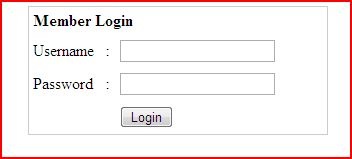
Objective: To create simple PHP Login Form .
Prerequisite :
In order to create simple PHP login form , we are going to use following tools .
- Notepad ++
- Xammp
- Google Chrome /Any Browsers
Step by Step Tutorial :
Step 1: Go to following link and click PhpmyAdmin is which under Tools menu .
http://localhost/xammp

Step 2 : Create Database ‘test_db’
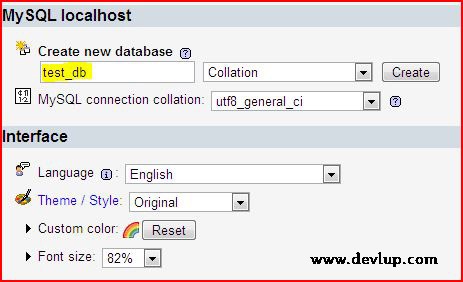
Step 3 : Create table ‘test’ with three fields .

Three fields are :
- Id
- Username
- Password

After creating Table ‘test’ with three fields , Click save button .
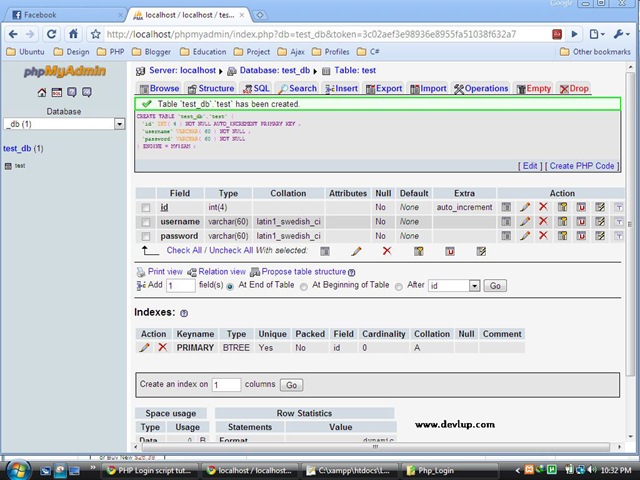
Step 4: Till step3 we have created Database and table name . Next we are going to insert the values in the table.(username and password).
We can insert in two ways :
- One way is directly which is same as we created the table .
- Second way is by inserting the SQL query.

Step 5 :Create four PHP files as mentioned below & Open notepad ++ and paste following php codes into it . Finally dont forget to save these files into htdocs folder .(It is present in XAMMP folder)
- main_login.php
- check_login.php
- login_success.php
- logout.php
Let’s create a folder say Login in htdocs folder , in which we will save all these php files which is mentioned above .


main_login.php
1 2 3 4 5 6 7 8 9 10 11 12 13 14 15 16 17 18 19 20 21 22 23 24 25 26 27 28 29 30 31 | <table width="300" border="0" align="center" cellpadding="0" cellspacing="1" bgcolor="#CCCCCC"> <tr> <form name="form1" method="post" action="check_login.php"> <td> <table width="100%" border="0" cellpadding="3" cellspacing="1" bgcolor="#FFFFFF"> <tr> <td colspan="3"><strong>Login Form </strong></td> </tr> <tr> <td width="78">Username</td> <td width="6">:</td> <td width="294"><input name="myusername" type="text" id="myusername"/> </td> </tr> <tr> <td>Password</td> <td>:</td> <td><input name="mypassword" type="text" id="mypassword"/></td> </tr> <tr> <td> </td> <td> </td> <td><input type="submit" name="Submit" value="Login"/></td> </tr> </table> </td> </form> </tr> </table> |
Output :


check_login.php
1 2 3 4 5 6 7 8 9 10 11 12 13 14 15 16 17 18 19 20 21 22 23 24 25 26 27 28 29 30 31 32 33 34 35 36 37 | <?php $host="localhost"; // Host name $username=""; // Mysql username $password=""; // Mysql password $db_name="test"; // Database name $tbl_name="test"; // Table name // Connect to server and select database. mysql_connect("$host", "$username", "$password")or die("cannot connect"); mysql_select_db("$db_name")or die("cannot select DB"); // username and password sent from form $myusername=$_POST['myusername']; $mypassword=$_POST['mypassword']; // To protect MySQL injection (more detail about MySQL injection) $myusername = stripslashes($myusername); $mypassword = stripslashes($mypassword); $myusername = mysql_real_escape_string($myusername); $mypassword = mysql_real_escape_string($mypassword); $sql="SELECT * FROM $tbl_name WHERE username='$myusername' and password='$mypassword'"; $result=mysql_query($sql); $count=mysql_num_rows($result); if($count==1){ session_register("myusername"); session_register("mypassword"); header("location:login_success.php"); } else { echo "Wrong Username or Password"; } ?> |
login_success.php
1 2 3 4 5 6 7 8 9 10 11 | < ? session_start(); if(!session_is_registered(myusername)){ header("location:main_login.php"); } ?> <html> <body> Login Successful </body> </html> |
logout.php
1 2 3 4 | < ? session_start(); session_destroy(); ?> |
How to run :
Go to browser and type
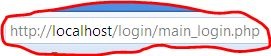
Note : Here ‘Login’ is folder name .
Now type the username and password (as we gave in the database) .

If username and password is correct then it will display :

otherwise it will show :

That’s it done .
Thank you for visiting my tutorial .

Very useful post, Nice Share, Keep Posting Bro .. 😀
Thanks Rahul !!
I get “Wrong Username or Password” for all credentials.
me toooo :(:( plzz help
This is ridiculous as you can just type in the success page address in the browser and it works….
@Manan try Again !! It worked for me and some of my friends also got output !! Where you got stuck ??
very good modifeid in our lauguage and create the login form step by step i am very happy for you
@Mohd Khalid thank you !!
ya TRUE..very useful..teach me alot..
Thanks Fara !!
thank you so so much! i am delighted
Cool … 🙂
great work buddy… if any one is getting error using header in check_login.php… u can use echo “”;
Thank you Divyanshu …
This is great and usefull
thank U
its was great to implement……. thanks a lot.
Its great to hear such comments ..thank you maria ..
Its cool bro do it again and make simpler more and more
hey, i got this ‘cannot select db’, help me pleasseeee
Hi Paeh ,
Did you gave “test” as $db_name ??
Suppose if I access login_success.php directly, without logging in…it is coming up…but it should not come up rt?
Great, easy steps, but I can’t get it to work!
Keeps coming up with “Wrong Username or Password”, yet I only have 2 records in my database.
Also, the login_success.php page is readily available to the user if they enter it in the address bar, I suggest using login_success.php as a redirect page to another page that requires a cookie to access maybe?
I am getting an error “Warning: mysql_num_rows() expects parameter 1 to be resource, boolean given”. I do not know how to solve it.
Hi Huda ,
I think you created the table but you forget to insert the values . Please try again and let me know in case of any issues .
Regards ,
Gautham
Hi i am getting the same error as Huda
i have the table and the user and password till this part
$sql=”SELECT * FROM $tbl_name WHERE user=$myusername AND password=$mypassword”;
from this point on the error is shown. is it something from with the query or what ?!
Hi Huda & Borko :
Possible reason is mismatch of table name . For example , In MySQL database you have given X as table name but in PHP you have given Y as table name .
Please let me know your thoughts .
hi guys i am getting this ‘cannot select db’, help me pleasseeee
mine says it cannot connect to DB. Why?
check the my sql database name and checklogin.php code . mismatching the two entires………..
Thank u Raj,it’s very easy&working.plz keep writing on more topics…. )
plz help me, my result is getting a warning.”Warning: mysql_num_rows() expects parameter 1 to be resource, boolean given in C:\xampp\htdocs\php\checking.php on line 31″
31th line code is: ” $count = mysql_num_rows($result); ”
any problem?
Hi Amal g ,
Possible reason is mismatch of table name . For example , In MySQL database you have given X as table name but in PHP you have given Y as table name .
Please let me know your thoughts .
“This is ridiculous as you can just type in the success page address in the browser and it works….”
This is not a secure way to setup a login, but it is a good intro. There needs to be a way to implement security for multiple pages so users can’t just save the url and have at it.
Hi Sadhu Baba,
Ya you are correct .. This is not secure . It is for beginners .
Thanks ,
Gautham
i’m getting an error like this : “Fatal error: Call to undefined function: mysql_real_escape_string()”. so how to solve it?
Thank You Thank You Very much….i have been trying to fetch the data from database from long time but i didnt sucseed….but with the use of this code i easily fetch data from database without any error……thank you thank you soooooooooooo much……..
I have done it,and it is working. Thanks.!
Thank you Raj, it’s very useful. Please keep on posting more.!!!
after typing in my username and password…it doesn’t show anything
how to logout u didnt mention that
Hi ,
Please try with this code in Logout.php :
2
3
4
5
6
7
8
session_start();
session_destroy();
if(session_destroy())
{
header("Location:main_login.php");
}
?>
Thanks,
Gautham
Yah………..It works also for me thank you MR ….But i did not know how to logout in this page …..please help me thanx again
Two steps to be followed.
1.Add the below script in login_success.php (after the message login Success)
2.Replace the script in logout.php using the script provided below.
i have problem logging in!
i have this error!
Warning: mysql_connect() [function.mysql-connect]: Access denied for user ‘ODBC’@’localhost’ (using password: NO) in C:\xampp\htdocs\login\check_login.php on line 9
cannot connect
can u check ur user name and password:
example my user name =root and password is not set.
so code is:
$host=”localhost”; // Host name
$username=”root”; // Mysql username
$password=””; // Mysql password
try it , like…!
Works great, thanks!
help me ! “cannot connect” on a check_login.php
Hi Tnam & Azz,
Please check whether database name , table name , username & password of PHP matches with MySQL .
Thanks,
Gautham
i have same problem like bro..can help me
Nice post Bro keep posting
Parse error: syntax error, unexpected T_VARIABLE in C:\xampp\htdocs\login\check_login.php on line 32
Very useful tutorial. very simple to follow
i have two error like this, how to fix this error?
Notice: Use of undefined constant myusername – assumed ‘myusername’ in D:xampphtdocslogin_samplelogin_success.php on line 3
Deprecated: Function session_is_registered() is deprecated in D:xampphtdocslogin_samplelogin_success.php on line 3
Login Successful
I have the same error. If anyone knows how to fix this, please help.
I did find this link: http://stackoverflow.com/questions/2600905/php-alternative-to-session-is-registered
But I still can’t get it to work.
However, I’m pretty sure it still works. If so, just add:
ini_set(‘display_errors’, 0);
This will make sure the browser does not show the error.
OKAY, sorry, 3rd post but I did get this to work. Using the site I linked to earlier, I came up with this solution:
session_start();
//ini_set(‘display_errors’, 0);
$myusername=$_SESSION[‘myusername’] ;
if(isset($_SESSION[$myusername])){
header(“location:main_login.php”);
}
Thanks Olivia .. !! You came up with correct solution .. Thanks again ..!!
Hi Lupo ,
Sorry for late response .
Please replace following code in Check_login.php
if($count==1){
session_register(“myusername”);
session_register(“mypassword”);
header(“location:login_success.php”);
}
with
if($count==1){
session_start();
$_SESSION[‘username’] = ‘myusername’;
$_SESSION[‘password’] = ‘mypassword’;
header(“location:login_success.php”);
}
This is happening as session_register function is deprecated in PHP’s new versions .
Hope this works .
got wrong username and password even if my username and pass is correct.
Hi Cris ,
Thanks for comments .
Please check table values which you inserted in MySQL table and let me know if you are still getting the same issue .
Thanks,
Gautham
Its great but could not connect to the database tell me why?
I get a error “Database connection failed: Unknown database ‘test'”
What’s up with that???
Please check whether the ‘test’ database is created.
Am new in php.This code is very much informative..I got the output…
thanks a lot….
But i did not know how to logout in this page
…please help me thanks again…..
Hi ,
Please try with this code in Logout.php :
Thanks,
Gautham
keep posting bro
Hi, im getting this error
Warning: mysql_num_rows() expects parameter 1 to be resource, boolean given in C:\wamp\www\login\check_login.php on line 27
Hi Timothy,
Whether you inserted min 1 set of values in your table . It is mandatory to insert the values in the table before you do execute the whole code .
Hope this helps ..If it doesn’t works .. Please let me know ..
Thanks,
Gautham
Another possible reason is mismatch of table name . For example , In MySQL database you have given X as table name but in PHP you have given Y as table name .
Please let me know your thoughts .
THANK YOU VERY MUCH!!!!!
thanx… this is what i searching for many days… well thanx…
i’m getting error like this.
Warning: mysql_num_rows() expects parameter 1 to be resource, boolean given in C:\xampp\htdocs\Login\check_login.php on line 27
Wrong Username or Password
how to do?
Hi,possible reason is mismatch of table name or database name . For example , In PHPmyadmin MySQL database you have given X as table name but in PHP code you have given Y as table name .
ok…. i get it.. thankz a lot! 🙂
That’s great 🙂
how to fix this?
Object not found!
The requested URL was not found on this server. If you entered the URL manually please check your spelling and try again.
If you think this is a server error, please contact the webmaster.
Error 404
localhost
03/08/2012 12:19:47
Apache/2.2.17 (Win32) mod_ssl/2.2.17 OpenSSL/0.9.8o PHP/5.3.4 mod_perl/2.0.4 Perl/v5.10.1
Dania,
check what have you given for action attribute
when i submit login page this error is coming
Warning: mysql_connect() [function.mysql-connect]: Access denied for user ‘ODBC’@’localhost’ (using password: NO) in C:\xampp\htdocs\training\php_site\login\check_login.php on line 9
cannot connect
Please help
Pravin,
Check your database connection parameters like username and password.
Thanks.
oh man! thankz for the help ~ 🙂 really useful for me.
I need more and more to do my final year project
because i have no knowledge about php. 🙁
Warning: mysql_num_rows() expects parameter 1 to be resource, boolean given in C:\wamp\www\samcollege\check_login.php on line 23
Wrong Username or Password
$sql=”SELECT * FROM $test WHERE username=’$myusername’ and password=’$mypassword'”;
these errors are occured what can i do?
Hi,
There is a query error in your code.Try to echo the mysql query and execute in phpmyadmin to check the error.
it usually occurs when the query execution returns false.
Thanks.
Hi Gautham, Thanks for the beautiful post. It is working well for me.
What can I do if I want the users to be directed 2 different landing pages. eg if admin logs in then the admin lands on a different page and if another user logs in then he lands on a different page. I cant seem to work with the header function to create this. Your help will be appreciated. thanks.
Warning: mysql_num_rows() expects parameter 1 to be resource, boolean given in C:\wamp\www\samcollege\check_login.php on line 23
Wrong Username or Password
this type of error is occured so what can i do for this?
please send me reply queckly……..
Hi Mangesh,
Possible reason is mismatch of table name or database name . For example , In PHPmyadmin MySQL database you have given X as table name but in PHP code you have given Y as table name .
Thanks,
Gautham
after doing all that this is wat i get after trying to login…………
( ! ) Warning: mysql_connect() [function.mysql-connect]: Access denied for user ”@’localhost’ (using password: NO) in C:\wamp\www\tests\login\checklogin.php on line 10
Call Stack
# Time Memory Function Location
1 0.0260 375096 {main}( ) ..\checklogin.php:0
2 0.0260 375800 mysql_connect ( ) ..\checklogin.php:10
error cannot connect
please help
Hi Tish ,
Did you activated Apache & Mysql module in Xammp control panel ? If it doesn’t works .. Please paste your version of check_login.php in comments .. we will sort out the issue .
Thanks,
Gautham
Hello!
I´m trying this code, but i get this errors:
( ! ) Notice: Use of undefined constant myusername – assumed ‘myusername’ in C:\wamp\www\login\login_success.php on line 3
Call Stack
# Time Memory Function Location
1 0.0003 366240 {main}( ) ..\login_success.php:0
( ! ) Deprecated: Function session_is_registered() is deprecated in C:\wamp\www\login\login_success.php on line 3
Call Stack
# Time Memory Function Location
1 0.0003 366240 {main}( ) ..\login_success.php:0
Could you help me please.
Regards
Hi Orlando ,
Please replace following code in Check_login.php
if($count==1){
session_register(“myusername”);
session_register(“mypassword”);
header(“location:login_success.php”);
}
with
if($count==1){
session_start();
$_SESSION[‘username’] = ‘myusername’;
$_SESSION[‘password’] = ‘mypassword’;
header(“location:login_success.php”);
}
This is happening as session_register function is deprecated in PHP’s new versions .
Hope this works .
after solving the above error i have this parse error below.how can i solve it.
Parse error: syntax error, unexpected $end in C:\xampp\htdocs\testing login\login_success.php on line 12
very superb .this is uses for my career starting in a good way
thank you soo much
Hi PRABAKARAN,
Good to hear ! Keep visiting our blog for more updates !!
Thanks,
Gautham
thanks for nice information about php…
Fatal error: Call to undefined function session_register() in C:\xampp\htdocs\loginpage\check_login.php on line 40
session_register() is depreciated as of PHP 5.3.0. You can use $_SESSION.
thank you , $_SESSION[“name”]
when i login it display a blank screen(white)
Warning: mysql_connect() [function.mysql-connect]: Access denied for user ‘ODBC’@’localhost’ (using password: NO) in E:\xampp\htdocs\login\check_login.php on line 17
cannot connect
hello i am new to php.I like this kind of post where everything explained step by step and i really appreciate the way you have explained.anyway i m facing an error session_register is undefined please help
Hi Ayushman,
Thanks !!
Please replace following code in Check_login.php
if($count==1){
session_register(“myusername”);
session_register(“mypassword”);
header(“location:login_success.php”);
}
with
if($count==1){
session_start();
$_SESSION[‘username’] = ‘myusername’;
$_SESSION[‘password’] = ‘mypassword’;
header(“location:login_success.php”);
}
This is happening as session_register function is deprecated in PHP’s new versions .
Hope this works .
Just one question, if I not working it in localhost, what I need to type in the “Host name” if for example my domain is http://www.example.com and my web host is http://www.host.com?
Ryan,
You need to check your server’s php directive which is undefined by default.Try to use localhost and let us know the status.
Thanks.
hi i am trying your code i got the main_login.php worked fine and after typing my username and password i got this error:
Warning: mysql_num_rows() expects parameter 1 to be resource, boolean given in D:\xampp\xampp\htdocs\check_login.php on line 27
Wrong Username or Password
Thank You for the codes……It run’s properly…..
this website is useful for creating login page.
Can you help me ?
Parse error: syntax error, unexpected ‘:’ in C:\Program Files\EasyPHP-12.1\www\intranet\login\check_login.php on line 33
It reffers to
header(“location:login_success.php”);
Regards and thanks in advange
Hi,
i need some help to resolve this problem wenn i test main_login.php:
Warning: mysql_num_rows() expects parameter 1 to be resource, boolean given in C:\xampp\htdocs\login\check_login.php on line 28
Wrong Username or Password
thanks in advance
Undefined index: mypassword in C:\wamp\www\test\checklogin.php
Looks like you are not receiving the password variable during form submit.
try this before accessing the password variable.
Hey, This one is very useful for beginner like me.
It looks so clear and easy when i find this.
Thank you so much.
hey,
i m getting an error
Fatal error: Function name must be a string in C:\xampp\htdocs\Login\check_login.php on line 31
could you plz help to solve it.
When i click “submit” i am shown the check_login.php file in my browser.